
Review note
Old documentation, kept for review. This page is retold in the new docs: FAQ.
❔ FAQ
Data & Security
Which our organization data will be stored by Motio or any third parties involved? Is the data encrypted? Please share your policy on handling such data.
We do not store any user and Qlik/Power BI data on our servers (instead of License information).
We use Google Analytics to collect statistics on the number of clicks on some Soterre BI Ops Analytics buttons, and this can be disabled in the Soterre BI Ops Analytics settings.
How is the data transferred between our organization Qlik/Power BI Server, Soterre BI Ops Analytics, and Soterre?
Soterre BI Ops Analytics is using internal chrome messaging API to communicate between context script (that is running on the context of opened Qlik/Power BI tab), opened extensions popup and background service worker - https://developer.chrome.com/docs/extensions/reference/tabs/#method-sendMessage.
To receive and pass data to Soterre, we are using GET and REST APIs, using the protocol that user has provided (http or https).
Other
How to download Log files in case you spot a bug?
If you stumbled upon a bug, before downloading logs make sure to reproduce the error.
Right-click on the Soterre BI Ops Analytics extension in the browser to access the context menu.
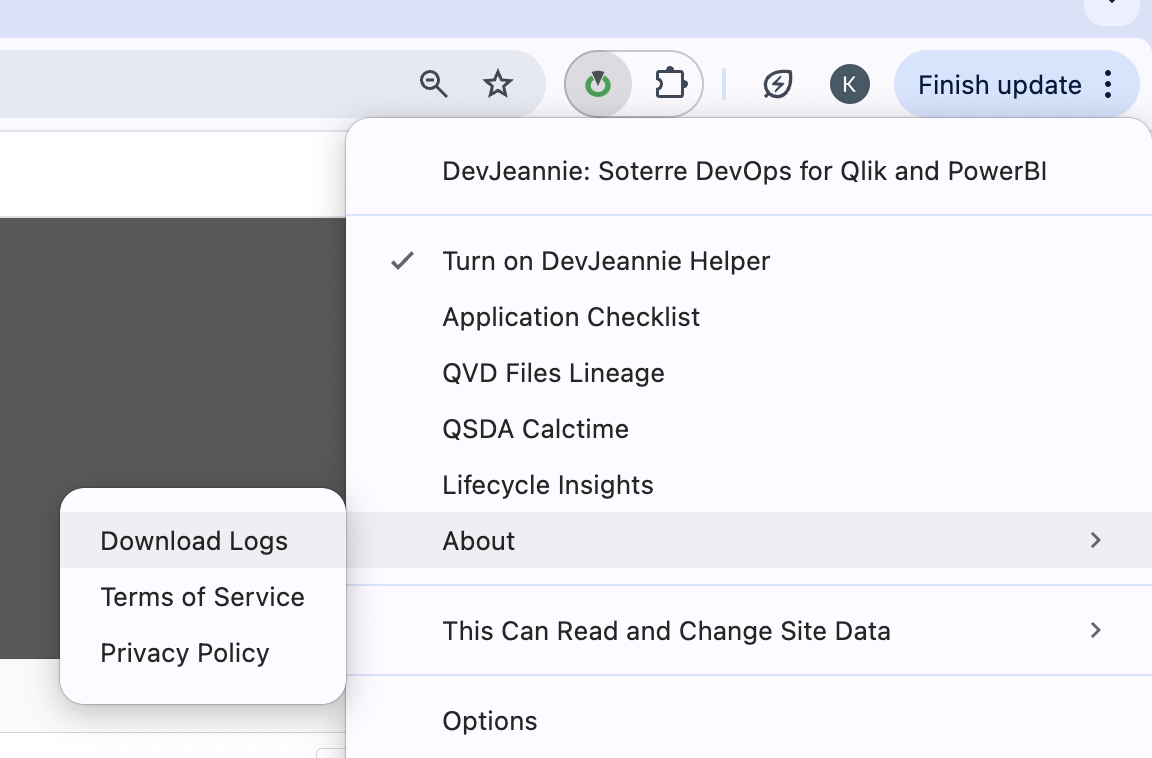
Navigate to the About section > click Download Logs. Send out a downloaded zip-file along with the description of the issue you're experiencing to our support portal for further help.
What happens if I turn on Soterre Helper?
Turning on Soterre Helper reveals several useful Soterre BI Ops Analytics features. It complements the standard Qlik Sense & PowerBI interface with additional buttons (Set a Thumbnail, Diff Viewer, Global Search, etc.).
We incorporate the CSS stylesheet in the web page that is rendered by the Qlik/PowerBI servers and hence modal windows are added by the Soterre BI Ops Analytics extension.
As a browser extension, we don’t have any right to the API method.
We cannot corrupt the Qlik Server.