
Soterre Connection
Almost every feature of the extension reads from or writes to Soterre, so the connection is the first thing to configure.
Get the API token
In Soterre open Edit User Profile → Account and copy the API token of your user. The extension acts in Soterre with the rights of that user.
One account for Qlik and Power BI
If your organisation uses Soterre for both Qlik and Power BI, make sure your Soterre user has access to both platforms — the extension uses one token for everything.
Enter the connection
Open the extension's Options page → Integrations → Soterre.
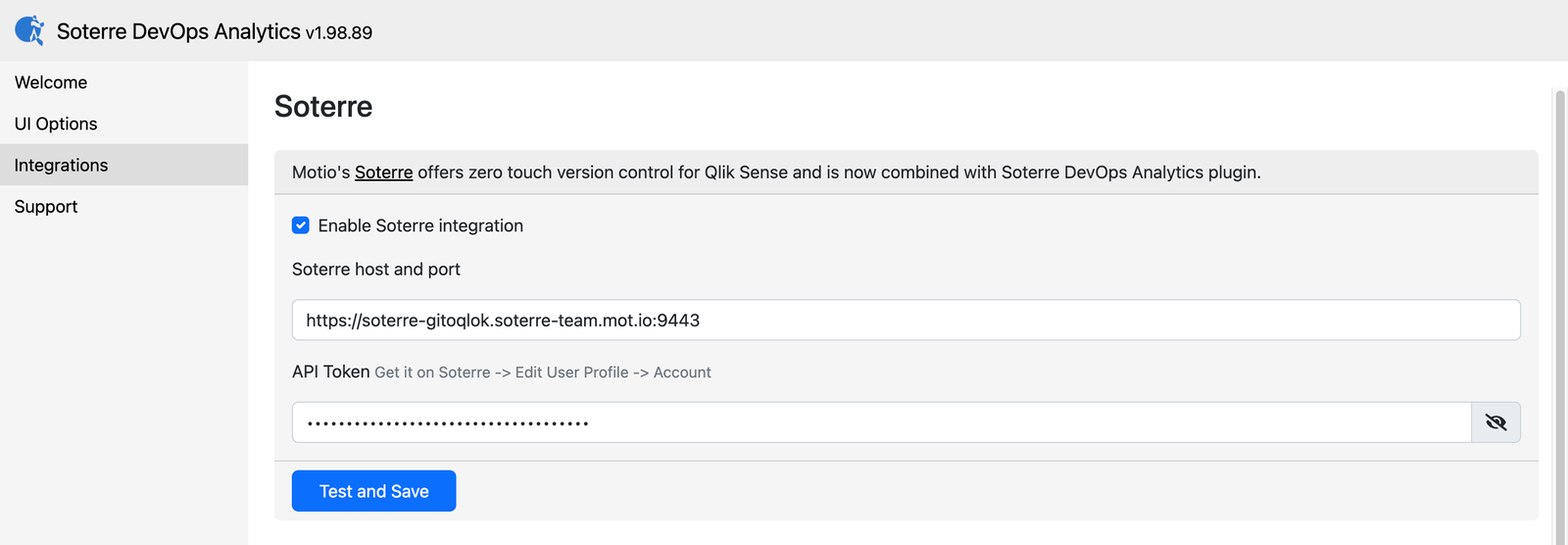
- Tick Enable Soterre integration.
- Soterre host and port — the URL of your Soterre server including the port, for example
https://soterre.example.com:9443. - API Token — paste the token.
- Click Test and Save. The extension calls Soterre with the token and reports success or the error.
Check the popup
Open a Qlik app or a Power BI report and click the extension icon. The header shows Connected and the server URL. If it shows an error instead, click it to jump back to the Options page.
Soterre requirements
| Feature | Minimum Soterre version |
|---|---|
| Timeline, Version Now, Restore, Time Machine, Diff Viewer, Import, Collisions | 3.1 |
| Global Search | 3.2.4 (Search Index enabled in Soterre) |
| Deployments from the extension | 3.2.18 |
| QVD Files Lineage | Dependencies graph enabled in Soterre |
| Lifecycle Insights usage data | Operations Monitor app ID configured for the Soterre node |
Self-signed certificates
If your Soterre server uses a certificate the browser does not trust, the extension shows a dialog asking you to open the Soterre URL once and accept the certificate; after that the connection works.
What works without Soterre
Set a Thumbnail, Unused Master Items, Dark Theme, QSDA Pro, QSDA Calctime, Pre-deployment Checklist, Reload Tasks and Glossary do not need a Soterre connection. Ask AI does: with the Soterre integration disabled, the Ask AI buttons explain that an active Soterre connection is required.
Settings managed by the Soterre administrator
A Soterre administrator can switch Ask AI off or restrict the AI providers for every extension connected to the server; the extension reads these settings with your API token and shows them on the AI Integration section of the Options page. See Central Settings from Soterre.