
Global Search
Global Search looks through the metadata of every environment that Soterre indexes — Qlik Sense servers, Qlik Cloud tenants and Power BI tenants — and finds objects by name or by the expression inside them. It helps you find an existing measure before you write a new one, and spot a duplicate app or report before you create one.
The results always open in the Global Search tab of the popup or side panel, so you can also start a search without a Helper button: Tools → Global Search in the main UI or in the extension icon menu.
Wherever you start, you can search for anything
The button you click only preselects the environment and the object type — it never limits the search. Once the panel is open, the artifact type dropdown offers every object type Soterre indexes for that platform, so a search started from a measure editor can just as well look for sheets, and a search started from a report can look for dataflows. Pick All types to search all of them at once.
Where you can start a search
| Place | Opens preselected on |
|---|---|
| Master measure editor: Global Search next to the name | Measure names |
| Master measure editor: Global Search next to the expression | Measure expressions |
| Qlik Cloud hub → Create new app | App names |
| Tools → Global Search in the popup or side panel | Nothing — an empty search |
What you can search for
The artifact type dropdown offers every object type Soterre indexes for Qlik, whichever button you started from: apps, sheets, measures, dimensions, variables and so on — by name or by expression — plus All types.
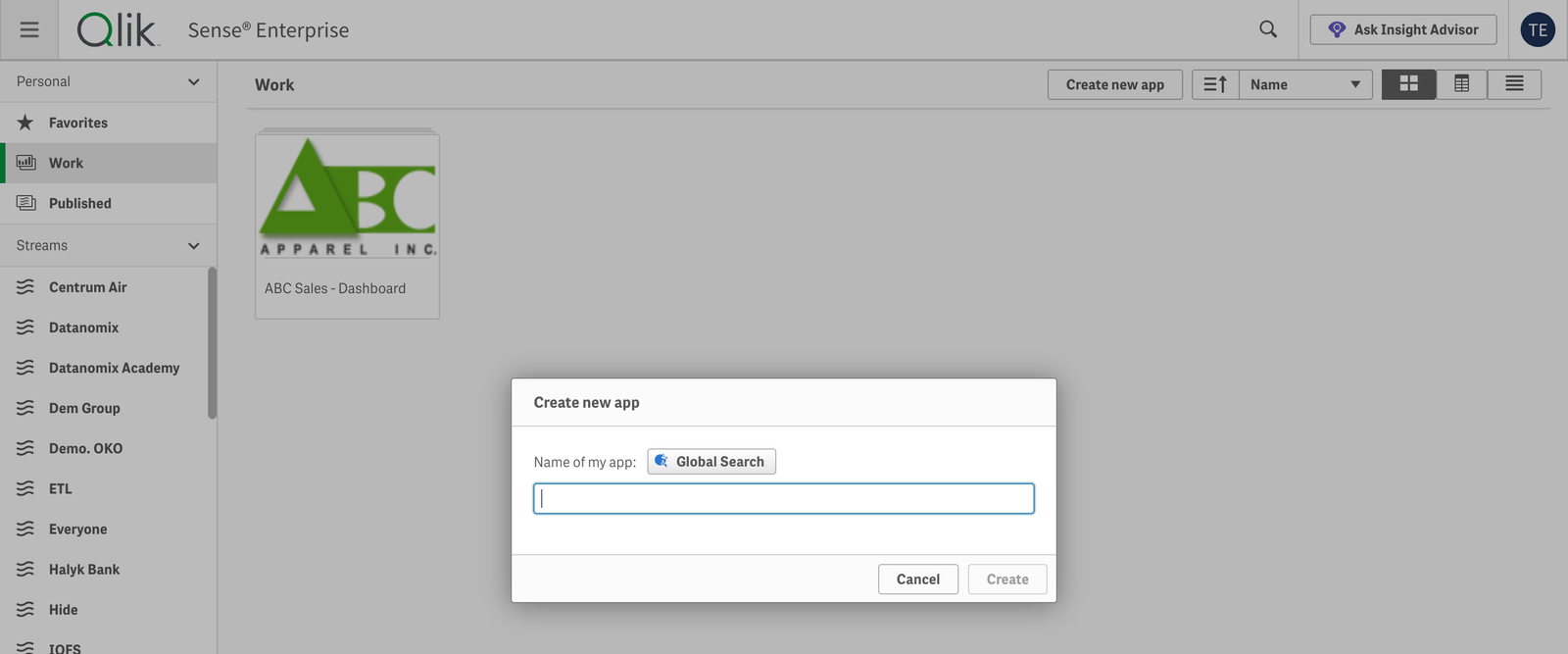
Global Search in the Qlik Cloud "Create new app" dialog
Example scenarios
- Finding existing measures. Before creating Average Balance, search for it: an existing measure with the same name but another expression turns up in the same stream. Name the new one Average Balance – Weighted to keep them apart.
- Reusing an expression. Search the expression you are about to write and find a more complete version in another app; copy it into the editor with one click.
- Avoiding duplicate apps. When creating Report for Stakeholders on the hub, Global Search shows Report for Stakeholders '2023 already exists; name the new app … '2024.
The one page that opens its own panel
Started from the Qlik hub's Create new app dialog, the results open in a separate side panel page — the hub has no tabbed main UI. Everywhere else Global Search is a tab.
Where you can start a search
| Place | Opens preselected on |
|---|---|
| Report toolbar: Global Search | Measure names |
| Report data model view | Measures and their DAX |
| Tools → Global Search in the popup or side panel | Nothing — an empty search |
What you can search for
The artifact type dropdown offers every object type Soterre indexes for Power BI, whichever button you started from: reports, pages, semantic models (datasets), dataflows, measures and their DAX and so on, plus All types.

Global Search and Diff Editor in the report toolbar
Example scenarios
- Before writing a DAX measure, search for its name across the tenants: an equivalent measure may already exist in another semantic model.
- Tracking down a calculation you remember seeing in some report — search a fragment of the DAX instead of opening reports one by one.
- Avoiding a duplicate report before you publish a new one into a shared workspace.
Reading the results
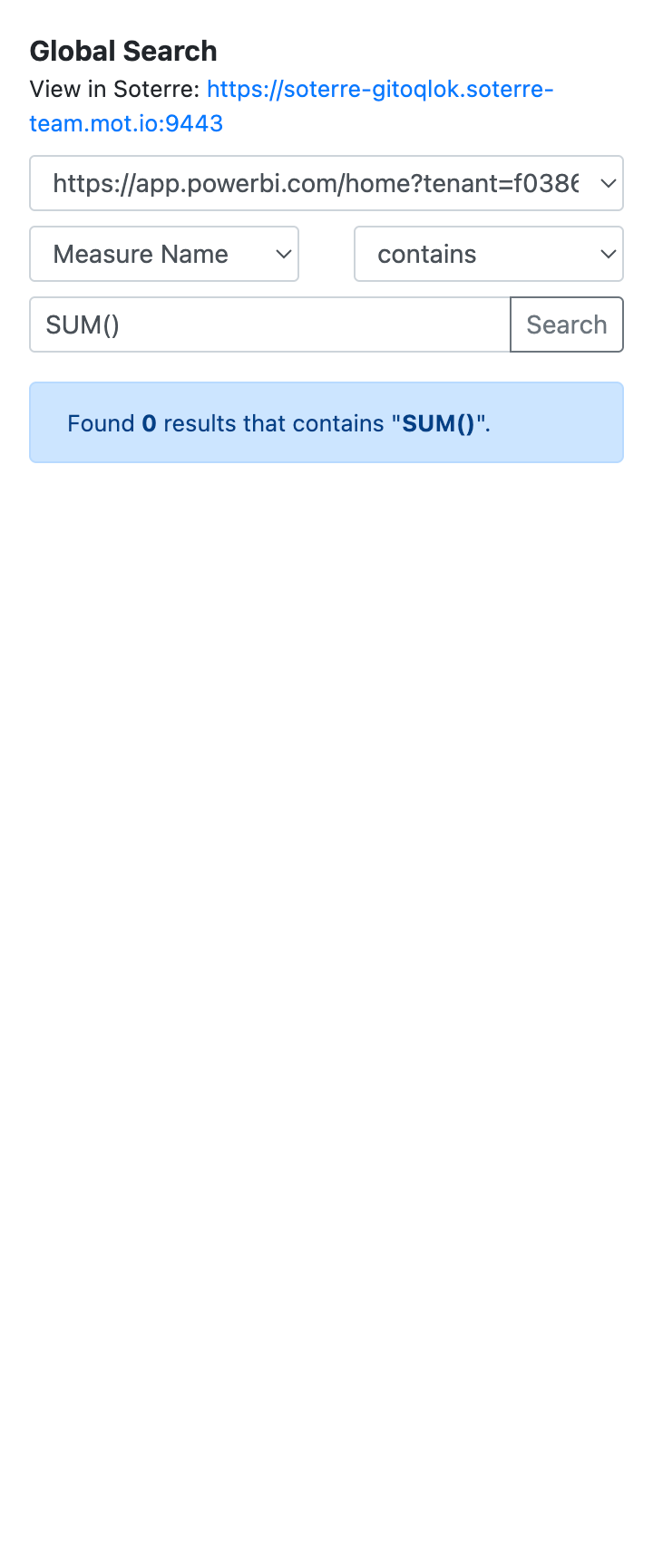
Searching the measures of a Power BI tenant
The panel is the same for both platforms:
- View in Soterre — the Soterre server the results come from.
- Node — the environment to search: a Qlik server or tenant, or a Power BI tenant. Preselected from the button you clicked, and changeable — switch node to search a different environment, including one of the other platform.
- Artifact type — what to look for (Measure Name, Expression, App, Report, …, or All types). Preselected from the button you clicked, and changeable at any time; the list follows the platform of the selected node.
- Match — contains and the other operators Soterre supports.
- The search text and the Search button; a banner reports how many results were found.
Each result shows the app or report it belongs to with a View in Soterre link, and a copy icon that fills the current measure's name, expression or description with the found value.
Soterre setting
Enable the Search Index in Soterre (3.2.4 or later) and let it finish indexing; otherwise the search returns nothing — on either platform.